Buyer's Guide · SEO
How to Redesign Your Website Without Losing Your Google Rankings
Rankings drop after a redesign when page addresses change and nothing forwards the old ones. A one-page redirect map prevents it, and you can check the work yourself.
Google keeps track of your site one page address (URL) at a time. When a redesign changes those addresses and the old ones start returning an error, Google removes them from its index, and nothing tells it that the new page replaces the old one. The fix is a redirect map: every old URL forwarded to its closest new page with a permanent (301) redirect, kept in place for at least a year. Save a copy of your current search data before work starts, check the new site for a leftover noindex tag on launch day, and submit a fresh sitemap. Google says to expect some fluctuation while it recrawls, and a few weeks or more for the new addresses to take over.
You can redesign your website without losing Google rankings, and the document that protects them is a spreadsheet you can read yourself. Picture a plumber in Henderson who has had the same site since 2017. It looks dated, but the water heater page sits near the top of Google and the phone rings. A new site goes live. It looks great. Three weeks later the calls slow down, and nobody can say why, because the new site is better in every way a person can see.
What changed is something a person does not see: the address of the water heater page. This article covers why that matters to Google, what to save before anyone touches your site, how the redirect map works, and the questions to ask a designer before you sign. The rules below come from Google's own documentation, linked as we go.
Why do rankings drop after a website redesign?
Google indexes your site one URL at a time. Your old site might have had a page at /water-heaters.html. The new one, built on a different platform, puts the same service at /services/water-heater-repair/. To you that is the same page with a new coat of paint. To Google, the old address now returns a "404 not found" error, and Google's documentation on how it handles status codes spells out what happens next: the indexing pipeline removes the URL from the index if it was previously indexed.
The new address has a second problem. Google says the vast majority of new pages it finds come through links, and the links you have earned over the years (your Yelp profile, the chamber of commerce directory, a neighbor's blog post, your own old Facebook posts) all point at the old address. They now lead to an error page.
Changed addresses cause most of the damage. Three smaller mistakes cause the rest:
- A leftover "noindex" tag. Designers often hide a site from search engines while it is under construction. If that tag ships with the finished site, Google drops the page entirely from its search results, exactly as instructed.
- Deleted words. The old service page had six paragraphs explaining what you do, where, and for how much. The new one has a headline and three icons. Google now has far less to go on when it decides which searches that page answers.
- Rewritten titles. The page title is the blue link people see in search results. Swap "Water Heater Repair in Henderson, NV" for "Services" and you have removed the phrase people were searching for.
What should you save before the redesign starts?
You cannot protect rankings you never wrote down. Before design work begins, collect four things. This takes about half an hour and does not require a developer.
- Your search data. Open Google Search Console, go to the Performance report, and set the date filter to "Last 16 months," the longest range Google's own guide points to. Click the Pages tab and export. That file lists the pages that earn you clicks and how many. If you have never set up Search Console, do it today; my post on why a website isn't ranking walks through it.
- A full list of your URLs. Your sitemap (usually at
yourdomain.com/sitemap.xml) is the starting point. Add any address from the export that the sitemap misses. - The title and main heading of your top ten pages. Copy them into the same spreadsheet. These are the phrases Google already associates with you.
- The text of those pages. Save each one as a PDF or paste it into a document. When the new copy gets written, you will want to compare.
Hand this file to whoever builds the new site. If they do not ask for it, that tells you something about how they plan to launch.
What is a redirect map, and how do you build one?
A redirect is a forwarding address. Someone (or Google) asks for the old URL, and the server answers "that page has moved here" and sends them to the new one. A redirect map is the full list: one row per old URL, with the new URL beside it. For a small business site, that is a spreadsheet with 10 to 50 rows.
Google's guide to site moves with URL changes sets out the rules, and they are short:
- Use permanent redirects set on the server. Google recommends HTTP permanent redirects, "such as 301 and 308." Its redirect documentation explains the difference: a permanent redirect tells Google to show the new page in search results, while a temporary one (a 302) tells it to keep showing the old one.
- Send each old page to its closest match. The old water heater page goes to the new water heater page. Google warns against pointing many old URLs at one irrelevant destination such as the home page, which "can confuse users and might be treated as a soft 404 error."
- Keep the redirects for at least a year. Google's wording is "as long as possible, generally at least 1 year." Old links around the web keep sending visitors long after launch, so there is no reason to remove them.
- Move the whole site at once. For small and medium sites, Google recommends moving all URLs together instead of one section at a time.
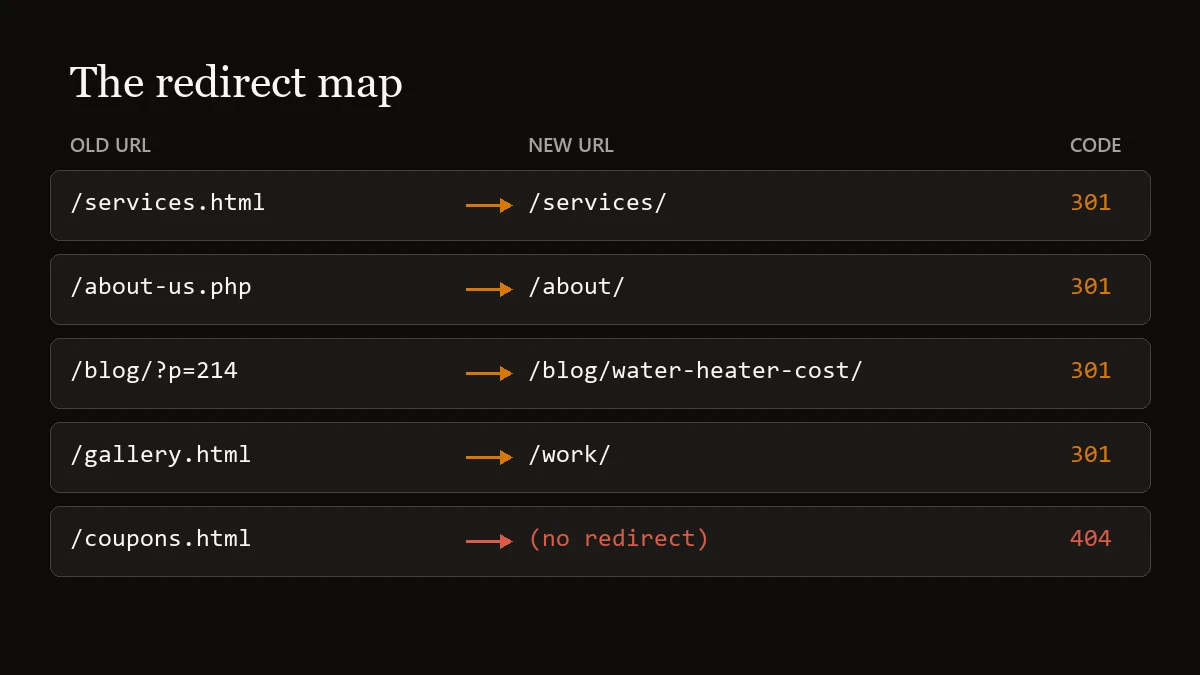
The best redirect is the one you never need. If the old address was sensible, keep it.
Two details trip up people who know the rules. First, the type of redirect depends on the host's defaults. On Cloudflare Pages, the host this site runs on, a redirect line with no code at the end is served as a temporary 302; the documentation says so, and you have to write "301" on each line to make it permanent. A designer who has not read that page will ship temporary redirects and never know. Second, if you are retiring a page and nothing on the new site covers the same ground, let it return a 404. Forwarding an old coupon page to your home page helps nobody.
How a redesign loses rankings
- URLs change because the new platform names pages differently, and nobody lists the old ones
- Every old address forwards to the home page
- Redirects are temporary (302) or done in JavaScript
- The preview site's noindex tag goes live with the launch
- Service pages get cut down to a headline and a photo
- Nobody opens Search Console after launch day
How a redesign keeps them
- Addresses stay the same wherever the old ones made sense
- Each changed URL has its own row in the redirect map
- Redirects are 301s set on the server and stay for a year or more
- Someone checks for noindex and robots.txt blocks before and after launch
- Pages that earn clicks keep their titles, headings, and substance
- The new sitemap is submitted and the numbers are watched for a month
What should you check on launch day?
You do not have to take anyone's word that the launch went cleanly. These five checks take about fifteen minutes.
- Test the old addresses. Take the top ten URLs from your export and type each one into a browser. Each should land on its matching new page. An error page, or the home page, means a row is missing from the map.
- Search the source for "noindex." On the new home page, right-click, choose View Page Source, and press Ctrl+F. If the word appears in a tag near the top that reads
name="robots", call your designer before you do anything else. - Open your robots.txt file. Go to
yourdomain.com/robots.txt. A line that saysDisallow: /with nothing after the slash blocks the whole site from being crawled. - Submit the new sitemap. In Search Console, open Sitemaps and enter the new sitemap address. Google's site move guide lists this as the way to help it learn the new URLs.
- Update the links you control. Your Google Business Profile, social profiles, directory listings, and any ads should point at the new addresses directly. Google's guide names profile links and ad campaigns specifically.
One tool you can skip: Search Console's Change of Address tool is for moving to a different domain name. If your domain stays the same, redirects and a sitemap are all Google asks for.
How long does it take for rankings to settle after a redesign?
Expect some movement even when everything is done right. Google's site move guide says that with any significant change "you may experience ranking fluctuations while Google recrawls and reindexes your site," and that for a medium-sized website it "can take a few weeks or more" for the new URLs to replace the old ones in results. A small business site with a few dozen pages sits at the small end of that range, but give it the same few weeks before you judge.
If your redesign also moved the site to a new host, Google notes that a temporary drop in how often it crawls is normal right after launch, followed by a steady increase over the next few days. You may also see an old address appear in results now and then during the changeover. That is expected too.
Worry when a specific page that used to earn clicks shows none after a month. Open the Performance report, use the Compare option in the date filter to set the weeks since launch against the weeks before, and check the Pages tab against your saved export. A page that vanished usually traces back to one of three causes: a missing redirect, a noindex tag, or a rewrite that removed what the page was about. All three can be repaired after the fact, and the sooner you catch it the less there is to recover.
What should you ask a web designer before a redesign?
Five questions separate a designer who has done this before from one who is about to learn on your site.
- "Will any page addresses change?" A good answer is specific: which ones, and why.
- "Who writes the redirect map, and when do I see it?" You want it before launch, as a file you can open.
- "Are the redirects 301s set on the server?" "The plugin handles it" is an answer worth a follow-up question.
- "What happens to the text on my top pages?" Trimming is fine. Deleting the page's subject is a problem.
- "Who checks Search Console after launch, and for how long?" If the answer is nobody, that job falls to you.
Redirects live on your hosting account, which is one more reason to know who owns your domain, hosting, and files. If the designer's account holds them and you part ways, the redirects go with it. For the broader vetting list, see how to choose a web designer in Las Vegas.
How I handle a rebuild
When I rebuild an existing site, I start from the old site's URL list and its Search Console data, before any design work. Wherever the old addresses were sensible, the new site keeps them, because a page that never moves needs no redirect. For the ones that have to change, I write the redirect map, set each line as a 301, test every row after launch, and hand you the map with the rest of your source files. It is part of the flat price, with no "SEO migration" line item added on.
I hand-code each site, so the page addresses are whatever you and I decide they should be. No platform is forcing /home-1 or /copy-of-services into your URLs. You can see finished examples on my work page, and if your current site is showing signs it is costing you customers, a rebuild done this way keeps what the old one earned.
Sources and further reading
- Google Search Central · Site moves with URL changes (permanent redirects, the one-year guidance, the home page warning, expected fluctuation)
- Google Search Central · Redirects and Google Search (how Google treats permanent and temporary redirects)
- Google Search Central · How HTTP status codes affect Google's crawlers (what happens to a URL that returns 404)
- Google Search Central · Block Search indexing with noindex (what a leftover noindex tag does)
- Google Search Central · Debugging drops in Google Search traffic (the 16-month date range and comparing periods)
- Google Search Central · Change your web hosting (the temporary crawl-rate drop after a host move)
- Search Console Help · Change of Address tool (only for domain changes)
- Cloudflare Pages · Redirects (302 is the default status code)
- Why Your Website Isn't Ranking on Google (setting up Search Console and the fixes that come first)
Planning a redesign?
Send me your current URL. I'll list the pages worth protecting, design a free preview of the new site, and you only pay if you love it.